Compare trips
Tap Compare Trips on a race. Use it for solo or with family, driving or flying, one hotel or another. A race can keep up to 4 trips.
-
Under New Trip to Compare, give it a name and tap Copy as New Trip. It starts as a copy.
-
Tap the pencil to change its name, people or nights, and change any price in its cost list. The chosen trip is not touched.
-
Go back to see the difference in total and by category.
Read the comparison
Section titled “Read the comparison”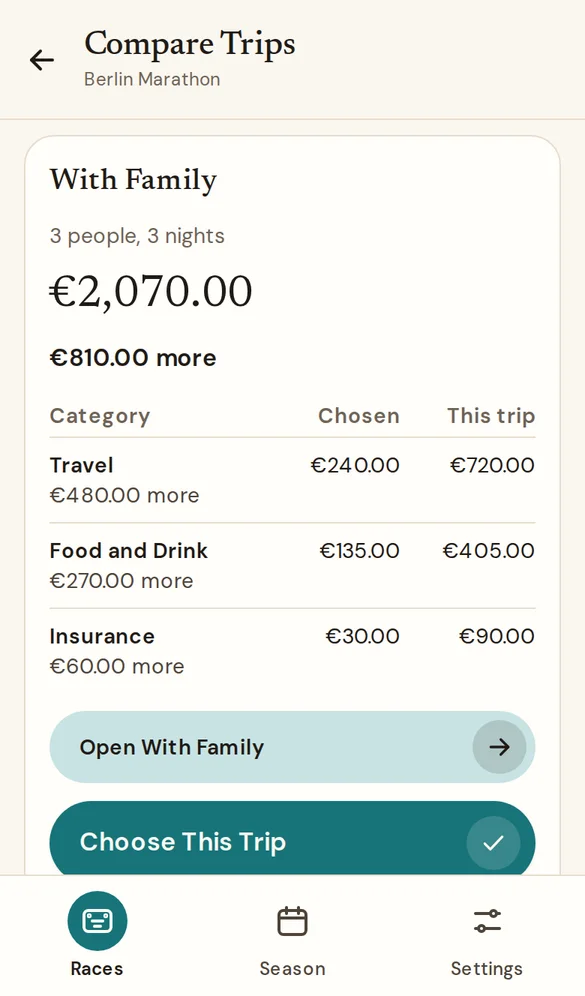
-
The full cost of this version, with its own people, nights and prices.
-
How much more or less than the chosen trip.
-
Only the categories that differ, chosen trip beside this one.
-
Change its prices, people or nights. The chosen trip is not touched.
-
Makes this the trip your money plan, reminders and season totals use.
The chosen trip
Section titled “The chosen trip”The races list, money plan, reminders, season totals and exported files use the chosen trip. Tap Choose This Trip to switch. Each trip keeps its own paid amounts: if they differ, the app asks first, so check your payments after switching.