I'm coming, the calendar and sharing a run
Tap a pin or a run in the list to open it.
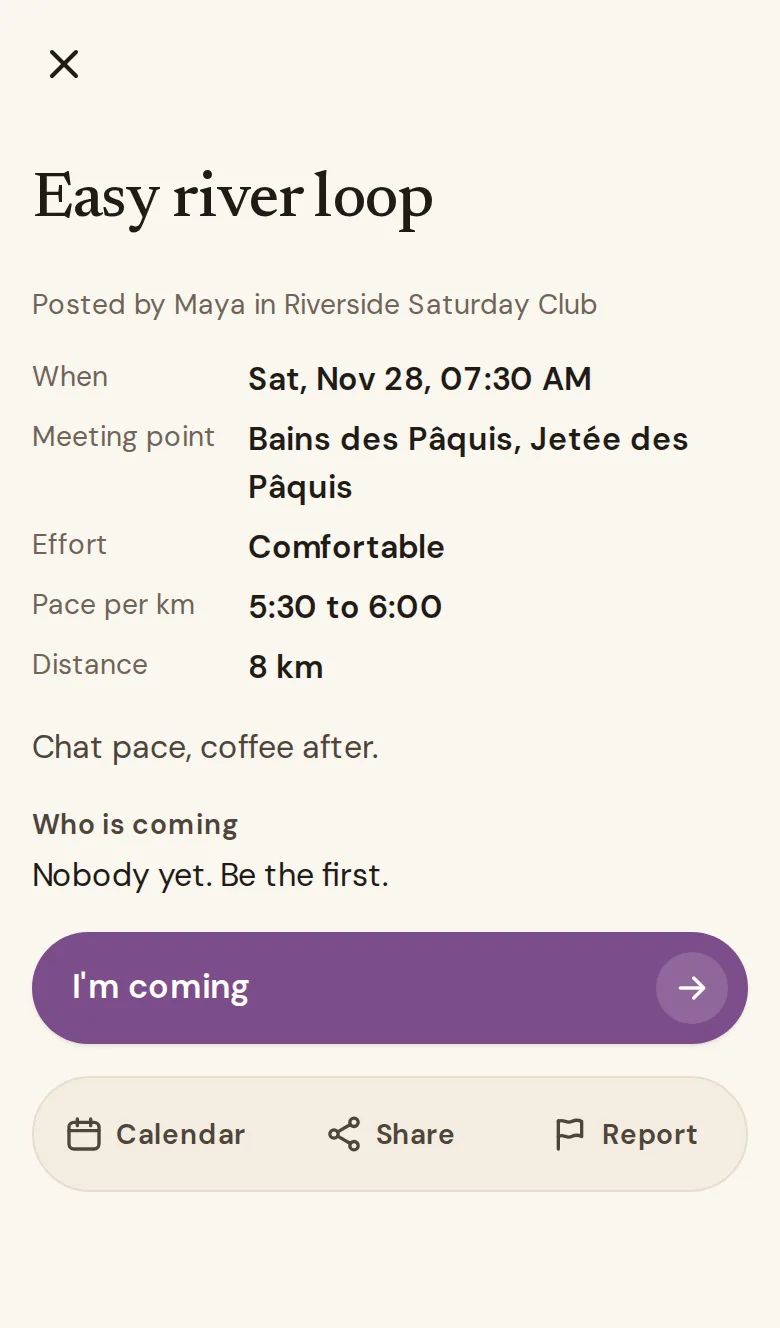
-
The member and the group the run belongs to.
-
Time in the run's own time zone, the meeting point, effort, pace per km and distance.
-
The first names of members who said they are coming.
-
Adds your name. It turns into I can't come if you change your mind.
-
Downloads a calendar file for your phone's calendar.
-
Copies a link to this run.
-
Tell the admin and the RunnerOutpost team about a problem with this run.
Say you are coming
Section titled “Say you are coming”Tap I’m coming. Your first name joins the list under Who is coming, and the number on the pin goes up. Tap I can’t come to take your name off.
Add it to your calendar
Section titled “Add it to your calendar”Calendar downloads an .ics file. Open it and your calendar app adds the run with its place, pace and effort. A weekly run is added as a weekly event. On the free plan the file carries the RunnerOutpost mark; Pro files do not.
Share a run
Section titled “Share a run”Share copies a link to the run, to paste into your group’s chat.
Report a run
Section titled “Report a run”Report lets you say what is wrong. The group’s admin and the RunnerOutpost team see the report. They do not see who sent it.